AI / On-device AI / OCR
I tested 4 small VLMs and 3 OCR engines for transaction extraction
I wanted to see how far small on-device models can get at reading a UPI screenshot and turning it into a clean transaction. The smallest model failed completely. The interesting part was what happened next.
- VLM
- OCR
- On-device AI
- Benchmarks
I keep hearing that small on-device models are getting good enough for real work. I wanted a concrete test, not a vibe check. Payment screenshots are a useful stress case: look at the image, then pull out amount, merchant, date, and maybe a category.
At first this looked like an OCR problem. The screenshot already has the words. OCR can read those words. But reading the words is not the same as understanding what they mean. A UPI screen can say "Paid to", "Received from", a long UTR, a bank name, and an amount with commas. I needed structured fields, not a pile of text.
So I asked a sharper question. How far can small on-device models get on this, and where do classic OCR engines still win?
Every test case followed the same path. Screenshot in. Structured guess out. Then score it against ground truth.
- 01
Screenshot
UPI or receipt image from the dataset.
- 02
Engine
OCR for glyphs, or a VLM for full transaction JSON.
- 03
Parse
Amount, merchant, date, category, transaction id.
- 04
Score
Field accuracy, safe auto-add, latency, size.
One screenshot, four guesses
Charts help. Seeing the same UPI screen next to each model's JSON helps more. I picked three real cases from the benchmark run and hid UPI IDs, transaction IDs, UTRs, and account tails.
Cash amount is clear. The hard part is ignoring noise and filling structured fields.
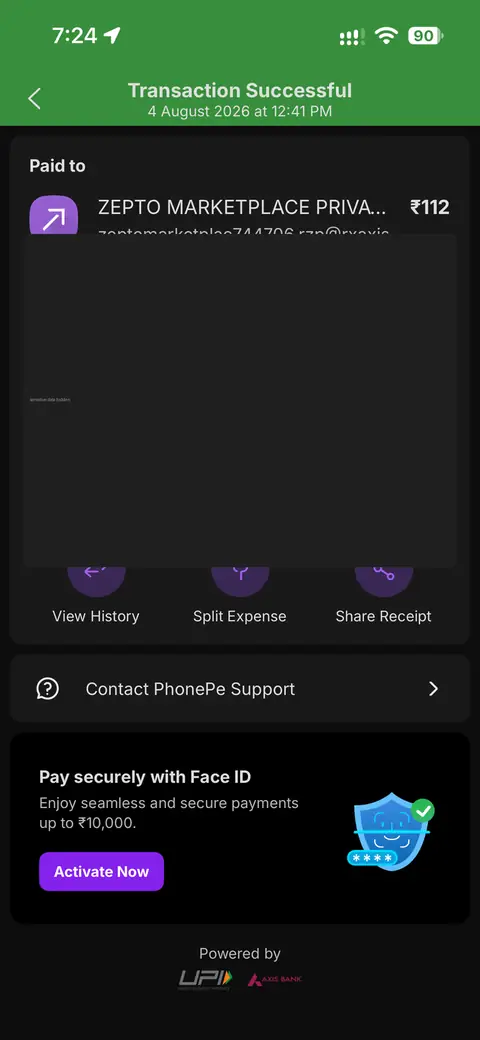
Ground truth
{
  "amount": 112,
  "merchant": "ZEPTO MARKETPLACE",
  "date": "2026-08-04",
  "spending_category": "groceries",
  "payment_method": "UPI",
  "transaction_type": "expense"
}
Model output
- amount
- merchant
- date
- category
{
  "amount": 112,
  "merchant": "ZEPTO MARKETPLACE PRIVAT...",
  "date": "2026-08-04",
  "spending_category": "shopping",
  "payment_method": null,
  "transaction_type": "expense"
}
What I expected
I expected the bigger VLMs to win end-to-end extraction. A VLM, or vision-language model, is a model that can look at an image and reason about what it sees. That sounded perfect for messy payment UIs.
I also expected something under 500 MB to be "good enough" if I kept the prompt tight. That hope did not survive contact with the benchmark.
The VLM lineup
I ran 26 real cases through Gemma 3n, Qwen2-VL 2B, SmolVLM2 2.2B, and SmolVLM2 500M. The metric that mattered most was complete transaction accuracy: did the model return a usable transaction object, not just one lucky field?
Which model actually returns a full transaction I can trust?
Gemma 3n: Best end-to-end result in this run. Still only about one in three cases.
Did the ranking stay stable as I added more cases, or did it flip late?
This is a running average over the 26-case run. Gemma pulls ahead early and holds. Smol 500M never leaves the floor.
If I only care about amount + merchant, who wins?
Gemma 3n: Solid, but not the leader when the bar is just amount and merchant.
If I only score amount + merchant, who stays ahead across the run?
Qwen takes the lead for auto-add and keeps it. That is why the summary bar and this line tell the same story.
The smaller model failed
SmolVLM2 500M was the romantic pick. About 361 MB on the scorecard. Easy to imagine on a phone. In this benchmark it scored 0% on complete transactions, safe auto-add, amount, merchant, date, and category.
It was also the slowest. About 16.8 seconds on average. So it was not just wrong. It made me wait to be wrong.
That changed the question for me. The useful filter is not "what is the smallest model?" It is "how small can the whole system get before it stops being useful?"
Where does each VLM actually help?
Amount is the easy win. Gemma and Qwen both hit 92%. Merchant is messier. Qwen leads at 64%. Category is where Gemma pulls away.
Latency sat around 5 seconds for the useful models. Five seconds feels like waiting for AI. That is fine for an offline import flow. It is not fine for a snappy camera experience.
How long does each VLM take before I get an answer?
Gemma 3n: Slightly slower than Smol 2.2B on average, but more consistent on p95.
Is the average hiding wild spikes, or is wait time mostly steady?
Most usable models sit near five seconds. Smol 500M stays high the whole way. Qwen has a few fast cases and some slower ones, which matches its weaker p95.
Then OCR got interesting
OCR does a different job. It is about glyphs: reading characters from the image. I ran Apple Vision, PaddleOCR, and Tesseract across 128 probes.
Paddle won raw accuracy. Apple Vision won the speed tradeoff.
Do I want the most correct glyphs, or glyphs that arrive fast enough to feel native?
PaddleOCR medium: 79.7% field accuracy at 5531 ms.
Which engine gets the field right more often?
PaddleOCR medium: Most accurate in the medium-model OCR run. Also about 48× slower than Vision.
Once the image is cropped to the field, how fast does each engine settle?
Cropped regions help everyone. Paddle stays on top. Vision is usable. Tesseract stays weak even with crops.
Where does each engine help or hurt?
Vision is surprisingly good at merchant names and still strong on transaction IDs. Amount is where it slips. That matches the feeling I care about in a UI: merchant text can look native, while money values need tighter handling.
Preprocess mattered too. Cropped regions helped everyone. Tesseract jumped from almost useless on full images to somewhat usable after upscale and contrast. I still would not build the first path on it.
The mobile OCR rematch
The first OCR ranking used Paddle medium. That is useful lab data. It is less realistic if you care about a small mobile package. So I ran a later pass with Paddle mobile v4 and v5 against Apple Vision.
If I only keep engines I could imagine shipping, who survives?
Paddle mobile v5: Slightly ahead on field accuracy. Still multi-second latency in this harness.
What does the user feel while waiting?
Paddle mobile v5: Correctness is close. Waiting is not.
Not one giant model. A small stack with clear jobs.
- 01
Capture
UPI screenshot or camera crop.
- 02
Glyphs
Apple Vision first. Paddle if accuracy needs a second pass.
- 03
Structure
Gemma for full transaction JSON and category.
- 04
Fallback
Qwen when amount + merchant auto-add is the only goal.
What I learned
- A tiny VLM can be small and still useless. Size is not useful by itself.
- Gemma is my current pick for full transaction quality. Qwen is the better pick when I only need amount and merchant.
- OCR is not obsolete. Vision gives me speed. Paddle gives me accuracy. They solve different moments in the flow.
- Five seconds of VLM latency changes the UX. Fast OCR can stay in the foreground. Heavy reasoning belongs in a deliberate import step.
What's next
I started by asking which model was best. I ended up asking a different question. How small can the entire system become before it stops being useful?
Next I want to test cropped regions before the VLM sees the image, a hybrid path where Vision extracts glyphs and a smaller language model turns them into JSON, and whether category prediction should live outside the vision model entirely.
→Technical details
VLM run id: 20260918T151644Z. OCR medium run id: 20260918T154441Z. OCR mobile run id: 20260918T170930Z.
Dataset size: 26 VLM cases and 128 OCR probes.
Practical picks from the combined ranking: Gemma for full transaction JSON, Qwen for amount+merchant auto-add, Paddle for OCR accuracy, Apple Vision for OCR speed. Skip SmolVLM2 500M and raw Tesseract without upscale.
Model sizes on the VLM scorecard: Gemma 2800 MB, Qwen 1500 MB, Smol 2.2B 1400 MB, Smol 500M 361 MB. On-disk weights in the benchmark repo were larger for some packs, including Gemma around 5.5 GB and Smol 500M around 635 MB.
| Model | Complete txn | Safe auto-add | Avg latency |
|---|---|---|---|
| Gemma 3n | 34.6% | 40% | 5.5s |
| Qwen2-VL 2B | 11.5% | 56% | 5.3s |
| SmolVLM2 2.2B | 11.5% | 12% | 5.2s |
| SmolVLM2 500M | 0% | 0% | 16.8s |